It started as 46 AI agents.
Now it’s an operator OS.
MIGI is a fleet of 46 autonomous AI agents that run Suman Debnath's personal brand work, job applications, expense tracking, journaling and uptime monitoring. It is operated from a two-factor dashboard and a Telegram bot, and guarded by more than 500 automated evaluation checks rather than by supervision.
Migi grew from a fleet that does my work into three identities I switch between in one control panel: MIGI, the 46 agent fleet; MIGI MAS, a multi-agent system I hand a goal to; and MIGI ECHO, a second brain I can talk to. Built entirely with Claude Code, on free infrastructure.
0
autonomous agents
one job each, all running
0
identities, one panel
fleet · MAS · ECHO
0
right brain per job
a fallback for every agent
0/7
in the cloud
no servers, no paid infra
$0
running cost
free-tier + a few $/mo, capped
0
security audits
independently audited + hardened
One person, operating like a team.
Migi is a portfolio of autonomous agents that run on a schedule — or on demand — in the cloud. No servers, no paid infrastructure. Each agent does one useful job: it watches something, summarizes something, drafts something, or remembers something, then reaches me on Telegram or email. Lately, some don’t do my work at all — they run the fleet itself.
It stopped being only a fleet. The same control panel now holds three identities — a fleet that does my work, a multi-agent system I hand goals to, and a knowledge brain I talk to — and it grew up as software: routing the right AI to each job, testing and healing itself, and hardened after two independent security audits. The whole thing is an argument for how one person operates in the AI age: leverage, automation and taste — not headcount.
One control panel. Three identities.
Not just a fleet that does my work and runs itself — now a fleet I can also delegate open-ended goals to, and a second brain I can talk to. A single animated toggle transforms the whole dashboard between the three worlds, each with its own logo, colour and cinematic transition.

One switch, three worlds. You don’t change tabs — you switch identities, and the entire experience re-themes around you.
MIGI
the fleet
46 agents that run my career & ops.
The original fleet: 46 cloud agents that monitor, learn, create and run my day — each doing one job and reporting back, plus a staff layer that runs the fleet itself.
- 46 scheduled + on-demand agents
- Monitors, curates, drafts, job-hunts, tracks money
- Reaches me on Telegram + email
MIGI MAS
a multi-agent system
Hand it a goal; a squad plans & executes it.
A team of specialist agents I delegate an open-ended goal to — by text or voice. A supervisor plans it, workers research, draft and critique, and it returns something for me to approve.
- Supervisor + researcher / analyst / writer / critic
- Composes the fleet agents as tools
- Human approval on every real action
MIGI ECHO
a knowledge brain
A second brain I can talk to.
A private RAG system that has read my notes, files and code. I ask by text or voice and it answers from my own knowledge plus live data, cites the source, and reads it back aloud.
- Feed it notes, docs, URLs, my repos
- Grounded, cited answers — text or voice
- Its own dedicated memory store
Simple parts, wired for leverage.
Agents fire on GitHub Actions, think with the right model for each job, speak through Telegram and email, remember in Supabase, and answer to a single secure dashboard.
46 Agents
GitHub Actions · cron + on-demand
Routed LLMs
right brain per job · free + premium
Telegram + Email
instant pings · designed digests
Supabase
shared brain · memory
Migi Dashboard
Next.js on Vercel · 2FA
Orchestration — cron + event-driven, one public monorepo of agents
The lead brain — heavy, quality-critical work (code review, cover letters, public content, MAS reasoning)
Routine + personal work — routed only through providers that don't train on my data, vision-capable for receipts, a fallback for every agent
Two-way channel — instant pings and slash-commands
Designed, email-safe HTML digests
Shared state — Postgres key/value + per-domain tables
The Migi dashboard — App Router, signed session
How the whole system was designed and shipped
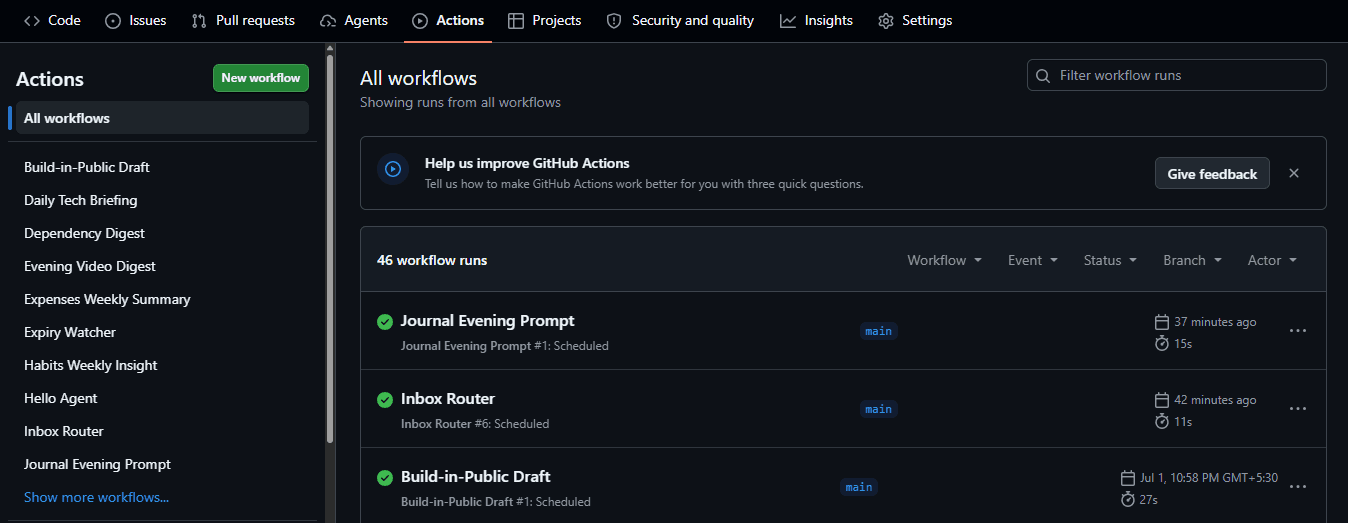
No mockups — every agent is its own scheduled GitHub Actions workflow.
Pillar one: meet the fleet.
Forty-six agents across seven areas — a career-and-growth layer, and a staff layer that runs the fleet itself. Twenty-five of them are below, each framed the same way: what it does, and why it helps.
Ship & Monitor
keep what I built alive
Uptime Sentinel
Pings every deployed site and flags anything down or slow, with an AI-written likely cause.
Never hear from a user that my site is down.
Keep-Alive
Stops free databases from auto-pausing, and warns me the moment one slips.
Side-projects stay live — for free.
Morning Standup
Reads my repos each weekday — commits, issues, PRs — and writes a 'where you left off' brief.
I resume the right project in seconds.
Dependency & Security Digest
Scans projects for outdated and vulnerable packages, then ranks what actually matters.
Security hygiene without the noise.
Domain & SSL Expiry Watcher
Warns me weeks before a domain or certificate lapses.
No silent outages.
Personal Brand
show up consistently
LinkedIn Autopilot
Curates the day's top AI stories for me to pick from, drafts the one I choose in my voice with a real takeaway, guards against repeating itself, and clears a safety review — then publishes on my yes.
Editorial control at the top of the funnel; leverage everywhere else.
I pick the story · human-approvedBuild-in-Public
Turns the day's actual commits into a short, shareable post.
Momentum, shared.
Learn & Curate
never miss the signal
Daily Tech Briefing
A designed morning email of the most relevant tech & AI news, pulled across many sources.
One skim instead of ten tabs.
Read-It-Later
Send any link to my bot; it summarizes, tags, stores it, and resurfaces the backlog weekly.
A reading queue that actually gets read.
Video / Article → Notes
Send a YouTube or article link and get structured notes plus action items back.
Consume long content in minutes.
Evening Video Digest
The latest uploads from my chosen creators and top AI channels — one line each.
Stay current on my terms.
Personal Ops
the admin that slips
Journaling Companion
An evening nudge — I reply once and it saves a structured entry, with a weekly reflection.
Reflection with zero friction.
Private-brain LLMReceipt → Expense Tracker
Snap a photo of a receipt; AI reads it, logs the expense, and sends a weekly spend summary.
Bookkeeping by camera.
Habit & Sleep Insights
A quick daily line; fortnightly it finds honest patterns — like late nights versus output.
Data telling me something true.
Meta / Flagship
the system thinking about itself
Idea-to-Spec Backlog
Text a one-line idea; get a mini-PRD, a free-stack recommendation, and a ready-to-build prompt — ranked in a backlog.
The antidote to builder's block.
Weekly Founder Review
Reads everything the other agents collected and writes a 'state of you' review with three focus areas.
A chief-of-staff that runs on my own data.
Career & Growth
find work · build · reach out · launch · money
Finance Tracker
Captures bank SMS and app notifications, de-duplicates the same transaction across both, learns my category corrections, and ignores payment reminders — a private, categorized ledger with budgets, alerts and a 24-month history.
An expense tracker I can actually trust.
Privacy-first · behind my loginJob Search
Continuously scouts target roles, scores each against my CV, drafts a tailored cover letter, and hands me an apply-ready packet with a direct link.
The tedious 95% of applying, done — I keep the final click.
No auto-submit · by designBuild Compass
Accumulates real demand from developer communities all week — weighing engagement and what people ask for — then ranks a Top-7 'build this next' with evidence and a kickoff prompt.
I build what people actually want, not what I guess.
Outreach Scout
Twice a week it surfaces freelance gigs, collabs and hackathons that fit me, and drafts a specific, non-cringe intro for each.
Opportunities I'd never find — with the intro already written.
Draft-only · I send it myselfSkill-Gap Advisor
Monthly, it compares what I've been building against what's rising in AI and names at most two skills to learn next — each with a first step.
One focused nudge a month, never overwhelm.
Micro-Launch Autopilot
For any repo I've shipped, it drafts platform-tailored launch posts (Show HN, Reddit, Bluesky, X, Product Hunt) and can auto-post the Bluesky one on a tap.
Ship, then actually announce it.
Draft-only except BlueskyStaff & Self-Management
the fleet that runs the fleet
The newest layer isn't more agents doing my work — it's agents that run the fleet itself. A one-person company where even the ops, QA and analytics roles are automated: an in-house CTO reviewing my code, a brand manager auditing my sites, and a team manager metering every AI call. The fleet reports on itself.

Automated CTO
Every morning it reviews new commits across every repo I own — auto-discovering new ones — for security, performance, quality, duplication and missing docs/tests, then sends one consolidated, severity-ranked PDF review to my phone.
A senior engineer looking over my shoulder, across everything I ship.
Only reviews what's newAI Brand Manager
Weekly, it audits every page of my live sites (found via each sitemap) for performance, accessibility and on-page SEO — plus Google rankings and traffic — and flags week-over-week regressions.
A marketing-ops team that never sleeps — catching a regression the week it happens.
Budget-aware · free tiersAI Team Manager
Meters every LLM call the whole fleet makes — cost, tokens, latency, failures and rate-limits, per provider and per agent — into a live dashboard, a weekly ops report and provider health checks.
You can't run a fleet you can't see. Now I can see all of it.
Self-observabilityOne chat to run the whole system.
Migi went from agents that message me to a system I talk to. Read any state I’ve captured, trigger any agent on demand, or feed it anything — all from one Telegram thread.
Send a link, a receipt photo, a habit line or a journal reply — each routes to the right agent automatically.
polling → event-driven webhook · replies now instant
Pillar two: hand it a goal.
The biggest leap. Instead of triggering one agent at a time, I give Migi a goal — typed or spoken — and a team of specialist agents takes it from there: a supervisor plans it, workers research, draft and critique. And this cycle it stopped just planning and drafting — it learned to do the thing, publishing live once I approve. It can compose my existing fleet agents as tools inside a mission, and runs fully isolated from the scheduled fleet — its own assistant, its own compute budget, its own space.
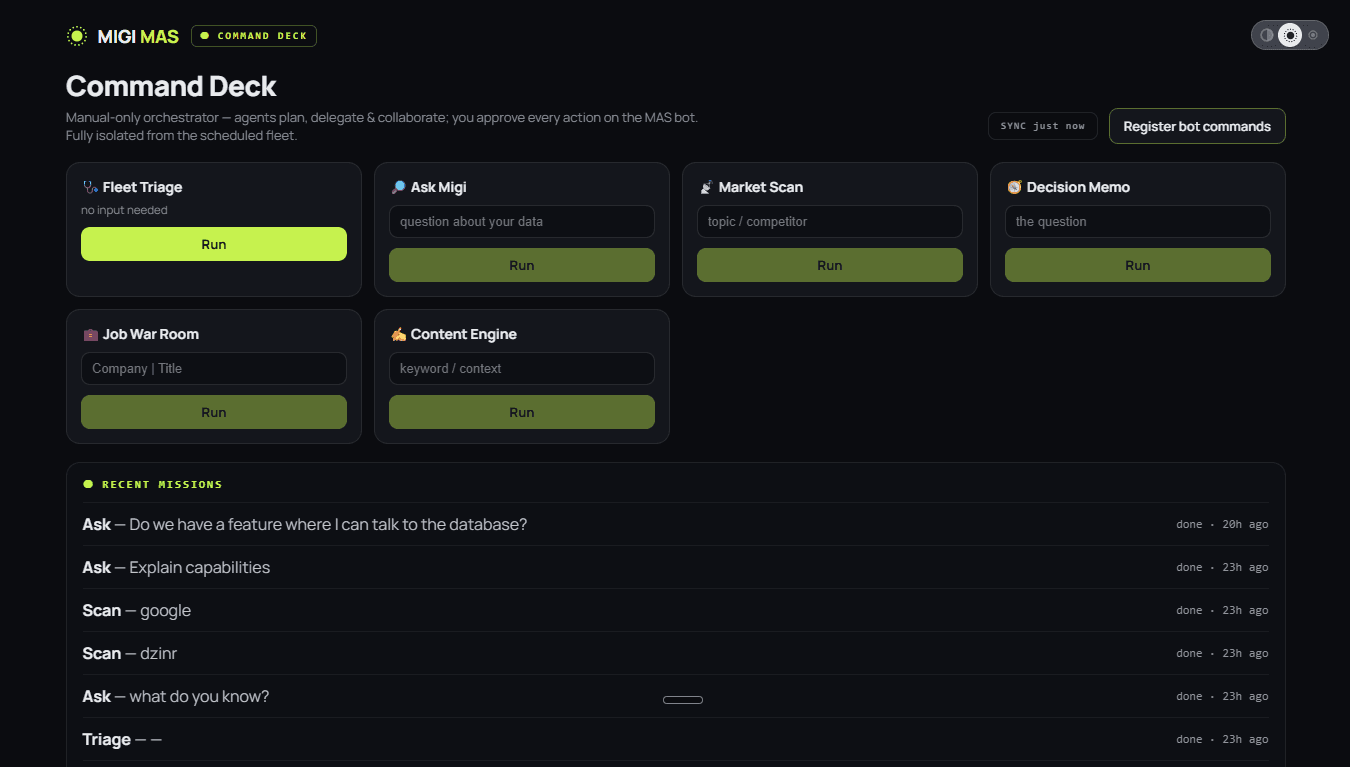
The MAS command deck — launch a mission, watch the squad work, and approve every real action.
From a team that drafts to a team that does it.
I hand it a task in plain English — “draft a post on this and put it out everywhere.” It researches, writes in my voice, shows me the finished version, and once I approve, publishes it across my platforms and sends me the links. Planning and doing, with me on the approve button.
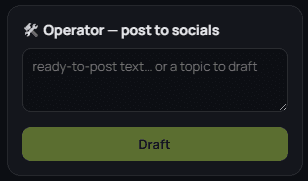
Hand it a task
In plain language — from the dashboard, or by chat or voice. Either the exact words to post, or just a topic to run with.
It researches + drafts
Given only a topic, the squad researches it and writes the post in my voice, tailored to each platform.
Approve or edit
The finished post lands behind an Approve / Edit gate — I revise it in one message (“punchier, drop the emoji”) and it re-drafts. Nothing goes out until I say yes.
It publishes live
On approval it posts to my LinkedIn, Bluesky and Mastodon at once — then hands me back the links to the live posts.
Goal in → mission out
I hand it a goal
Typed or spoken — a voice note is enough. One open-ended objective instead of a single-agent trigger.
A supervisor plans it
It breaks the goal into a plan and delegates each step to the right specialist worker.
Specialists collaborate
A researcher, an analyst, a writer and a critic work through a shared workspace — and can call my existing fleet agents as tools.
They critique each other
Drafts get reviewed and sharpened before anything reaches me — not one model's first guess.
I approve every action
It plans and proposes; every real-world action waits for my explicit yes. Human-in-the-loop by design.
Real missions it runs
Draft & publish a post
Give it a topic or the exact words; it researches, writes in my voice, and — on my yes — publishes to LinkedIn, Bluesky and Mastodon with the links back.
Job-application prep
Research the company, score my fit, draft a tailored cover letter and a warm-up post.
Content draft
Take an angle and produce a finished, on-voice piece — researched and critiqued.
Market / competitor scan
Survey a topic or a competitor and come back with a structured read.
Decision memo
Write a reasoned memo on an open question, with the trade-offs laid out.
Ask across all my data
Answer a question over everything I've captured, at once.
Pillar three: talk to your knowledge.
A personal, private RAG system — a second brain that actually knows my work and my life. I teach it anything (notes, documents, web pages, even my own code repositories), then I talk to it by text or voice; it answers from my own knowledge plus a live read of my data, cites where each answer came from, and reads it back aloud. Searching your notes is friction; conversing with them is leverage.
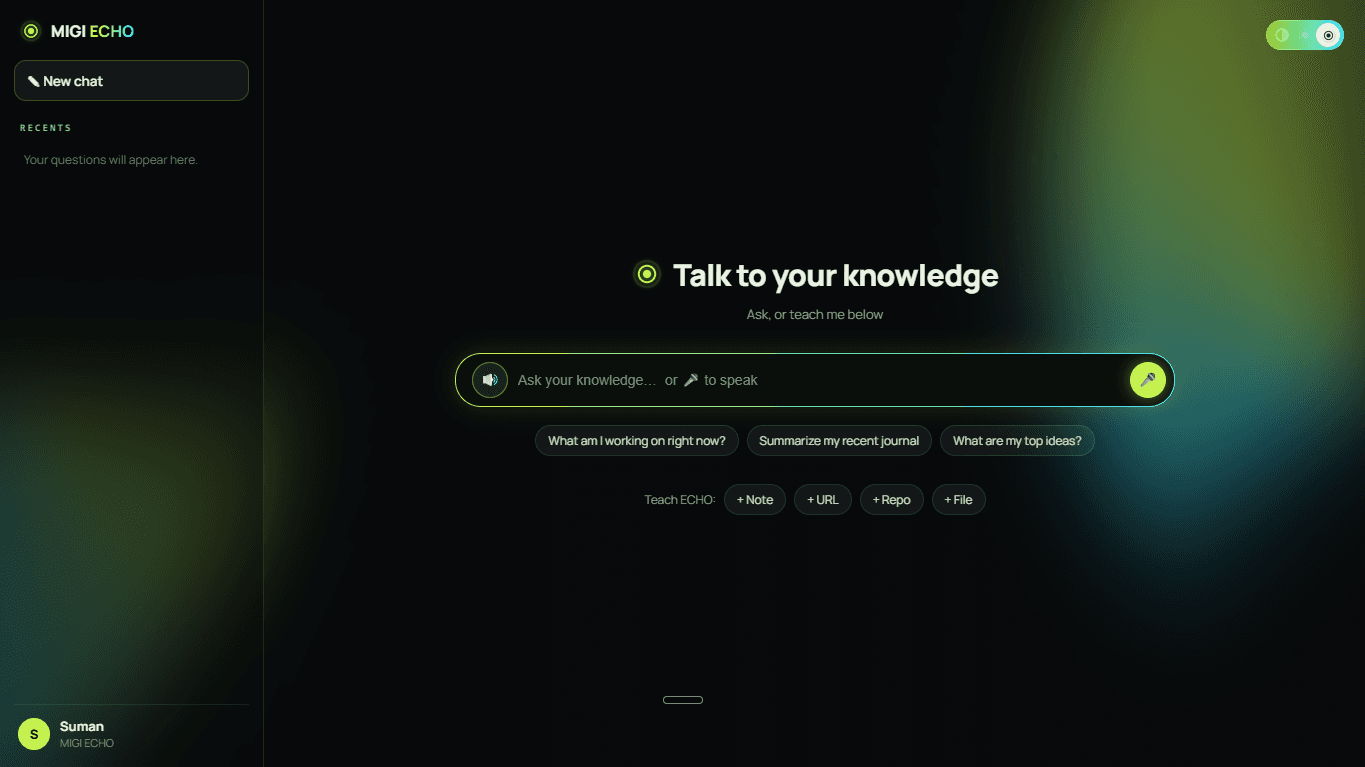
The ECHO knowledge chat — ask by text or voice, get grounded, cited answers read back aloud.
Teach it, then ask it anything
Teach it anything
Typed notes, PDFs and Word docs, a URL, or one of my GitHub repos — it reads, chunks and remembers each one.
Ask it any way
Type or speak, on the web app or a dedicated assistant — it transcribes my voice and understands the question.
Grounded + cited
Answers pull from what I've taught it plus a live read of my own data, and it tells me the source — or says “I don't know that yet” instead of inventing.
Reads it back
On the web it speaks its replies aloud with a free browser voice — a real conversation, not a search box.
Its own memory
A dedicated store so my knowledge can grow without competing with the fleet — inside a modern chat UI with a history sidebar.
One model for everything? Not anymore.
Migi stopped using one AI for everything and started thinking like a team lead — assigning each job to the right brain, with a backup for every brain, on a budget, without ever risking a breakage. A premium model leads the heavy, quality-critical work; free models handle the routine; and every agent has an ordered fallback chain.
Each agent’s primary brain and its exact fallback order — a provider’s bad day never stalls the fleet.
How the routing thinks
Premium on the hard problems
The reasoning-heavy, reputation-facing agents — code review, cover letters, my public content, the multi-agent war room — run on a top-tier paid model for quality.
Free on the routine
The light, high-volume agents stay on free models. Capability matched to cost, per task — model orchestration, not “call an API.”
A fallback for every agent
Each agent has an ordered fallback chain; if its first-choice model is throttled or down, it drops to the next — so a single provider's bad day can't stall the fleet.
Cost-controlled
Runs on the order of a few dollars a month, with per-provider spend tracked live on the dashboard — which brain, how many calls, what it cost.
Fail-safe
Strictly opt-in: pull the paid key and every agent silently falls back to free models — zero breakage. One switch dials the priciest agent between premium and free.
Privacy-aware routing
My most personal data — journal, finances, habits — is routed only through privacy-respecting providers, never free tiers that might train on it. Vision tasks are pinned to image-capable models.
A fleet that regulates itself
rate-limits · 7d
110
call-limit events absorbed — the fleet falls over to a backup provider when one says wait.
early-warning before failureIt paces itself
Agents space out their AI calls to stay under each provider's per-minute ceiling, so a busy agent can't stampede the limit and knock out the others.
It backs off politely
When a provider says “slow down,” the fleet honors its own retry timing instead of hammering — and falls back to a second provider so a critical daily job never just fails.
It watches its own health
A live diagnostics view shows exactly which agent and minute is under pressure, with an early-warning signal that flags call-bunching before it turns into a failure.
The fleet grew up as engineering.
Prompted by two independent audits, this cycle didn’t add a fourth pillar — it added the engineering-maturity layer. Migi went from “a fleet that runs” to “a fleet you can trust and build on”: it tests itself, heals itself, plugs into any AI assistant, safely bolts on premium-tier free tools, and starts to learn from how I use it — all still on $0 infrastructure, all human-in-the-loop.
It tests + hardens itself
A growing automated test suite guards the agents' core logic and runs on every change; every job has production guardrails — time limits, no double-runs, least-privilege — and self-recovers from transient database blips.
Evolve it fast, and trust it still works.
It heals itself
A failure-triage agent spots any agent that fails, reads the error, diagnoses the likely cause and a suggested fix, and messages me — suggestion-only, it never edits code on its own.
I learn what broke and how to fix it before I go looking.
A resilient backbone + a built-in editor
Multiple free AI providers with automatic failover so no single outage stops the work; a self-critique pass reviews my public content for voice and quality before it ever reaches me.
Resilience and a quality gate — for free.
It connects to any AI
Migi exposes its capabilities as standard, reusable tools any AI assistant can plug into — query my live data, trigger an agent, remember something — via the emerging industry standard for AI tools. It runs locally and privately.
A closed system became an open platform.
Free power-ups that can't overspend
A budget-guard lets me bolt on premium-tier free services — sharper recall, cleaner web reading, real-time research — each metered against its monthly free limit and auto-falling-back to baseline the moment it's spent.
Scale capability on free infra, strictly upside.
Agents that learn + watch the web
Adaptive memory learns my preferences over time — my content voice improves from the edits I make. A browser agent watches chosen public web pages and alerts me the moment something changes. Alert-only, human-in-the-loop.
The fleet improves from how I use it — and can see the live web.
Free power-ups, metered — they can’t overspend
free-tier budgets · metered add-ons · agents fall back to baseline when a budget is spent
premium-tier knowledge retrieval
within free limit · resets monthly
clean page extraction
within free limit · resets monthly
live web search
within free limit · resets monthly
I don’t outsource my voice. I edit with it.
A closed-loop content engine that keeps me visible on LinkedIn. It surfaces the day’s best stories, drafts in a voice that’s mine, and guards against repeating itself — I choose the topic, shape the angle, and give the final yes. Editorial control at the top of the funnel; leverage everywhere else.
Curates the day's news
Every morning it gathers the top ~7 AI developments, each with a one-line “why this matters.”
I pick the story
I choose what to talk about with a single tap — or tell it to auto-pick, or skip the day. The highest-leverage decision — what to say — stays mine.
Grounds it in me
It ties the chosen story to my real work and point of view — never inventing experience.
Writes in my voice
A studied high-engagement structure: a scroll-stopping hook, short punchy lines, one concrete takeaway, a sharp close — and it has to add real value, never just rephrase the news.
Never repeats itself
It checks the draft against what I've recently posted and avoids reusing topics or opening lines, so the feed stays varied and intentional.
Safety review
A multi-layer guardrail keeps every draft legal, authentic, non-political and safe for a public feed.
Asks me
The draft lands on Telegram with Approve / Edit / Regenerate. One tap for a fresh angle, or plain-language edits it applies instantly.
Publishes
On my explicit yes it posts to LinkedIn — in full and correctly formatted — and logs the live post.
Reports
A weekly recap of what went out, and how it performed.
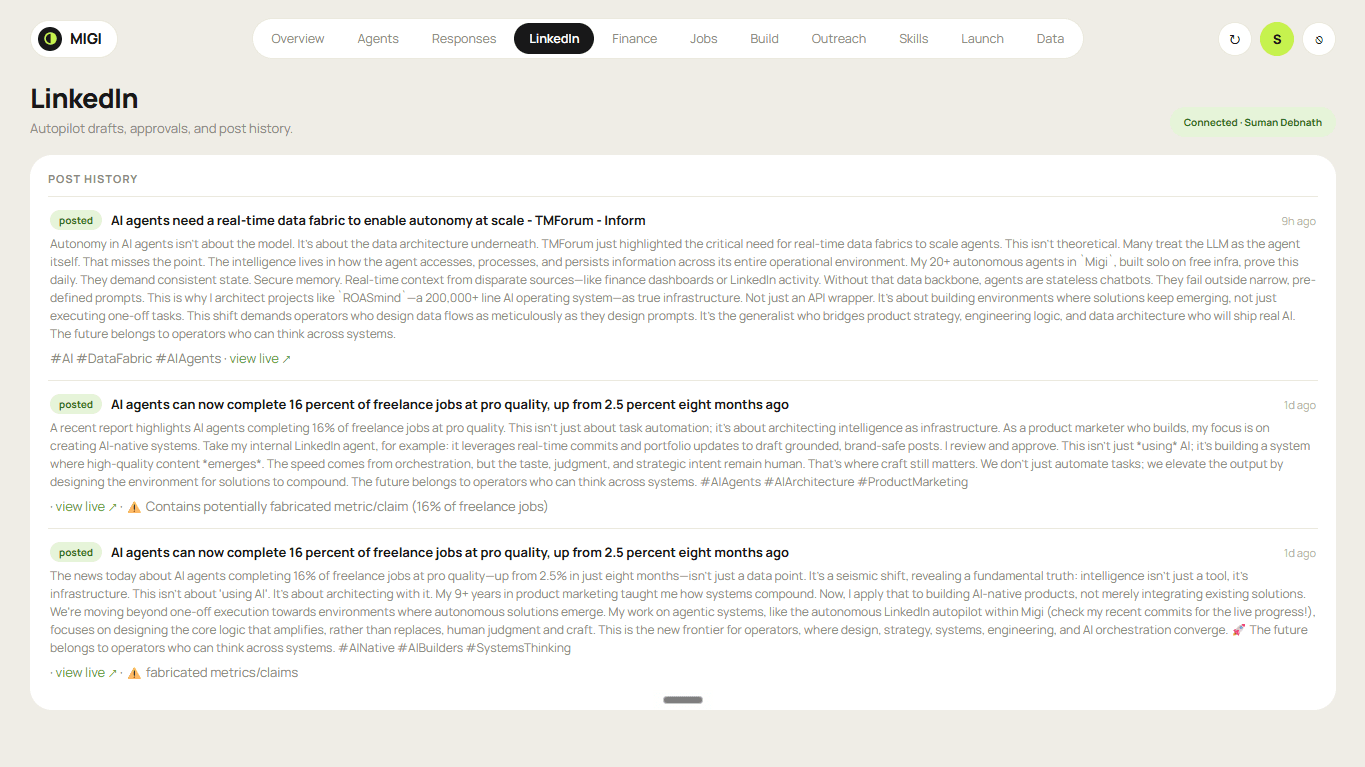
The LinkedIn control & audit view — drafts, approvals, and full post history in one place.
Publish once. Repurpose everywhere.
Right after it publishes to LinkedIn, the autopilot offers to shorten and rewrite the same story — in my voice, with real, clickable hashtags — for Bluesky and Mastodon too, or to pick a different story for those. Both are free, open networks; still draft-and-approve.
From an SMS to a categorized ledger.
A privacy-first money agent I hardened the way you’d harden a real product, not a demo — trained on my own bank messages and shipped with a test suite. It captures both bank SMS and app notifications, de-duplicates the same transaction across them, learns my category corrections, and ignores everything that looks like money but isn’t — so only money that actually moved is logged, with manual cash entry, a 24-month history, budgets and a full audit trail. All behind my login.
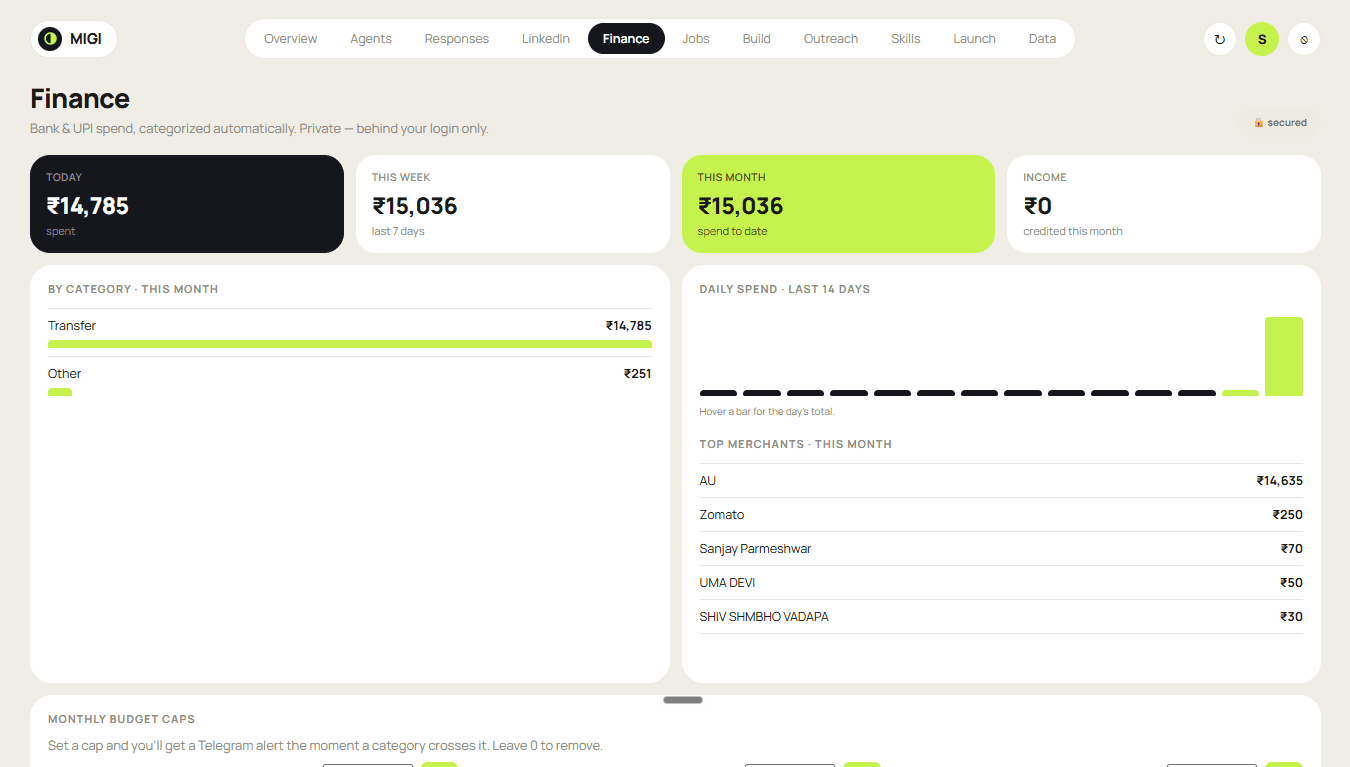
The Finance tracker — spend by period, intelligent categories, top merchants and budget caps.
How it automates the money
Captures both channels
It reads both bank SMS and banking-app notifications, so nothing slips through a channel gap.
De-duplicates
When the same transaction arrives on both channels it's merged into one — matched on the bank's reference number — while two genuinely identical purchases stay two.
Filters the noise
Ads and recharge offers, payment-due and EMI reminders, money I received, OTPs and pending authorizations are all recognized and skipped — a deterministic rule I can read and test, not a guess. Only money that actually moved is logged.
Categorizes & learns
Sorts each spend into real-world categories (rent, EMI, OTT, groceries, misc…) — and when I re-categorize a merchant, it remembers next time.
Takes manual entry too
A one-tap form captures cash spends the phone never sees.
Tracks & guards
A 24-month history, daily/weekly/monthly rollups, budget caps with instant alerts, and a full audit trail — private, behind my login.
The layers inside
Capture
Reads bank SMS and app notifications the instant they arrive.
Dedup
Merges the same transaction across channels on its reference number.
Filter
Recognizes and skips payment reminders — logs only real spend.
Learning
Remembers my category corrections, per merchant.
Privacy
Strips account numbers and drops OTPs before anything is stored.
Ledger
24-month categorized history, budgets, alerts and audit trail.
Trained + tested like a product
Trained on real messages
Taught on a labeled set of my own bank-message screenshots, so it learns exactly what is — and isn't — an actual payment.
A deterministic decision
The log-this / skip-this call is made by rules I can read and test; the AI only helps with the genuinely fuzzy parts. It can't be talked into logging an ad as a purchase.
One payment, counted once
When the same payment arrives from two sources, the bank's record is the source of truth — so a single EMI or premium is never double-counted.
Ships with a test suite
Dozens of labeled real-world cases run in one command and prove the classifier is right — so I can change it fearlessly and catch any regression instantly.
See the whole thing in motion.
The complete tour — the three identities, the dashboard, the agents and the routing, all in one take. Press play and watch Migi actually run.
The tedious 95% of applying, done.
It continuously scouts target roles, scores each against my CV, writes a tailored cover letter, and hands me an apply-ready packet with a direct link. I make the final click — deliberately no auto-submit, for quality and full compliance — then track the whole pipeline on the dashboard.
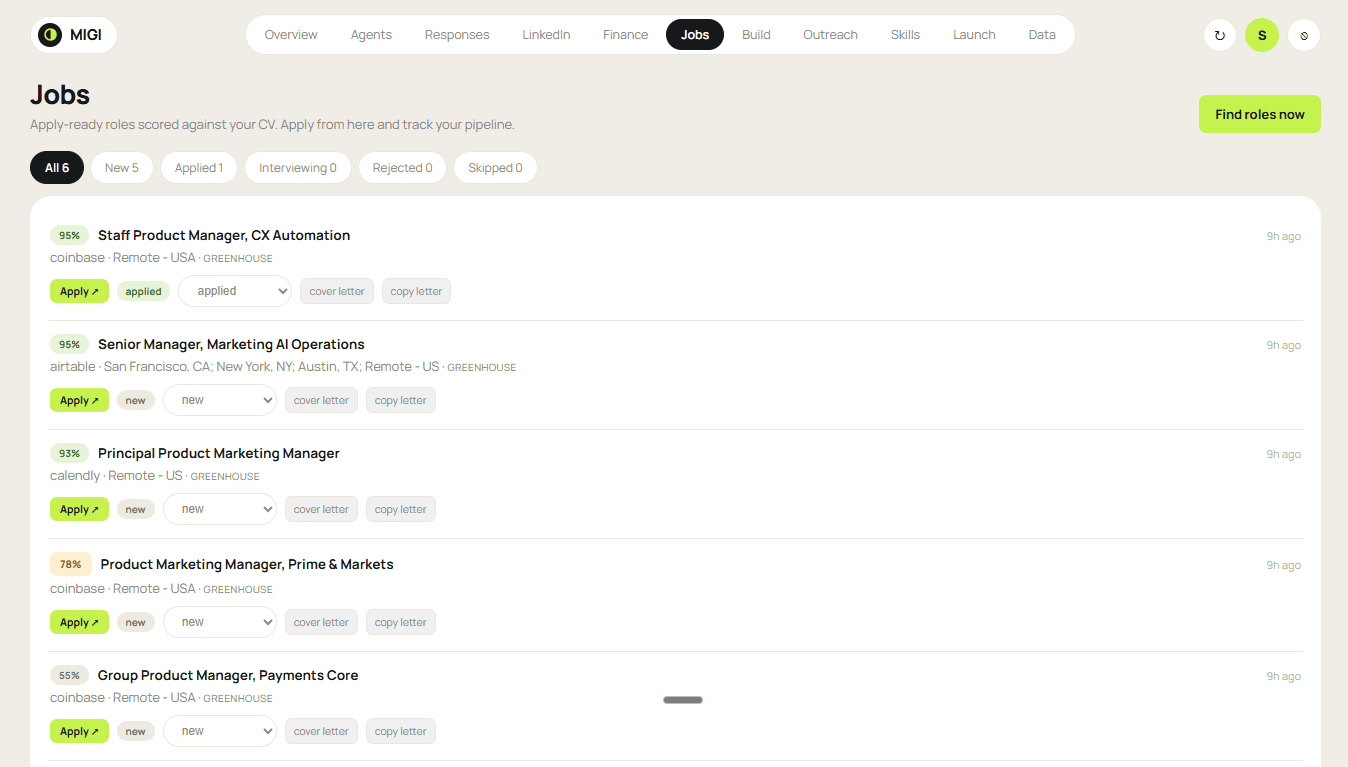
The Jobs tracker — match scores, cover letters, direct apply links, and a new → applied → interviewing → rejected pipeline.
How it automates the hunt
Scouts roles
Continuously scans job boards for roles that fit my target.
Scores against my CV
Ranks each opening with a match score, so the strongest fits rise to the top.
Writes the cover letter
Drafts a tailored cover letter for each role, grounded in my real experience.
Packages it apply-ready
Hands me a complete packet with a direct apply link — everything but the final click.
I click apply
Deliberately no auto-submit: higher quality and fully compliant. The submit is always mine.
Tracks the pipeline
Every role moves through new → applied → interviewing → rejected on the dashboard.
The layers inside
Discovery
Scouts target roles across job boards, continuously.
Matching
Scores each role against my CV for genuine fit.
Generation
Drafts a tailored cover letter per role.
Packaging
Assembles an apply-ready packet with a direct link.
Human gate
I make the final apply click — never auto-submitted.
Pipeline
Tracks every application through to its outcome.
Reviewed the way it’s actually screened.
Anyone can paste a resume into a chatbot for one generic opinion. This parses the file like an applicant-tracking system, scores it against the actual live roles my job agent is tracking, and reviews it through the same three sets of eyes that screen it in real life — then hands back prioritized fixes and tracks the score over time.
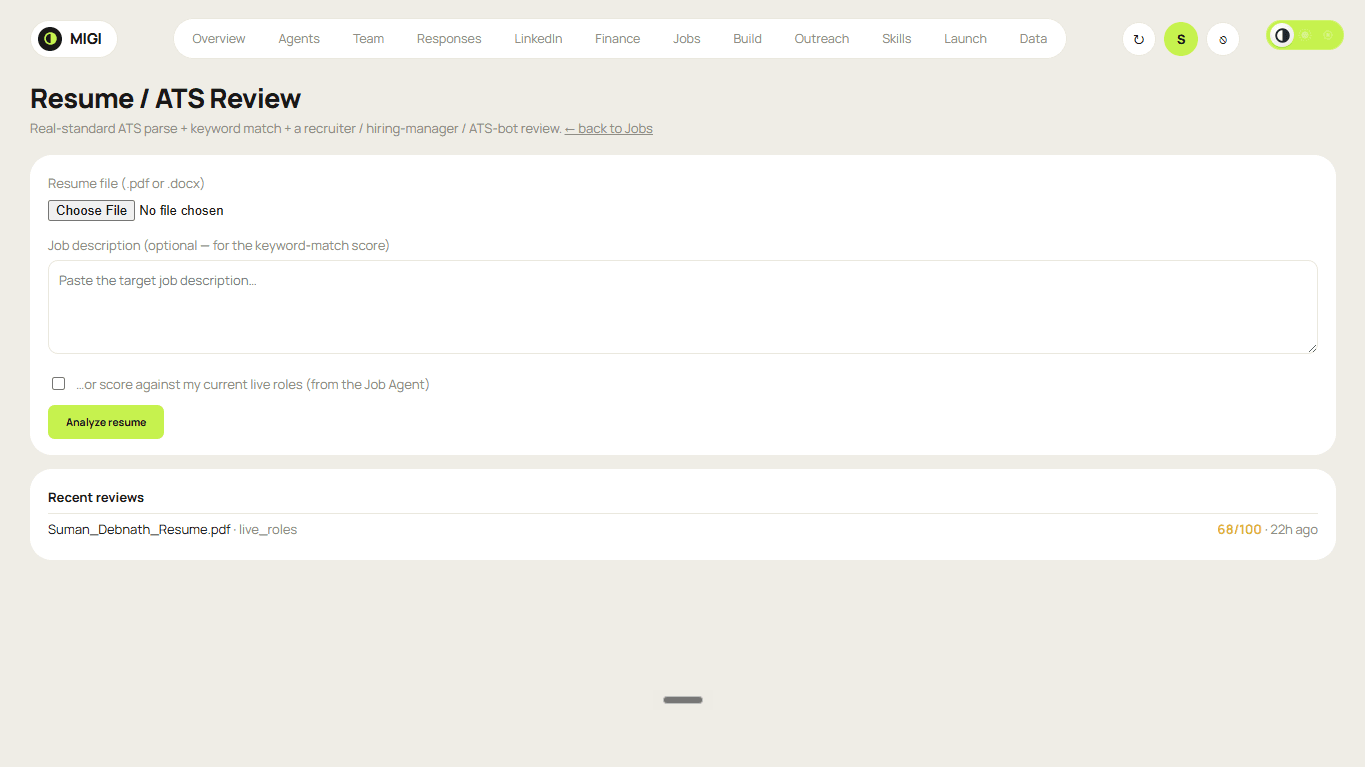
The Resume / ATS reviewer — ATS-style parse, keyword match vs my live roles, and a tracked score history.
How it reviews
Parses like an ATS
It reads the file the way an applicant-tracking system does, and flags the traps that get resumes auto-rejected: multi-column layouts, tables, text trapped in images, un-parseable dates and sections.
Matches the real roles
It scores the resume against the actual live roles I'm targeting — pulled by my job agent — for a real match-rate with the exact missing keywords.
Three review lenses
It reads as a recruiter, a hiring manager and an ATS bot in turn, then hands back prioritized fixes.
Tracks the score
Every review is logged, so I can watch the score climb as I fix what it found.
Three lenses
Recruiter
The 6-second scan — does it land at a glance?
Hiring manager
The depth read — does the substance hold up?
ATS bot
The machine parse — does it survive the filter?
What actually lands on my phone.
Not concepts — real messages the agents send me every day, as instant Telegram pings and designed email digests. Public content only; personal data stays private.
.jpeg&w=3840&q=75)
.jpeg&w=3840&q=75)
.jpeg&w=3840&q=75)
One console to command them all.
One animated toggle switches this control panel between all three identities — the fleet (this light operator dashboard), the MAS command deck and the ECHO knowledge chat. On the fleet side it’s a full operator OS behind a password and authenticator-app 2FA, with its own tracker for each workflow: Finance, Jobs, Resume, Build, Outreach, Skills and Launch. It meters itself too — a Team observability page (12-month usage, cost and tokens by provider, a per-agent breakdown, live health and a “needs attention” panel), home staff-summary cards, and a redesigned data page — plus fleet health, live domain status, a responses feed, and one-click Run for any agent.
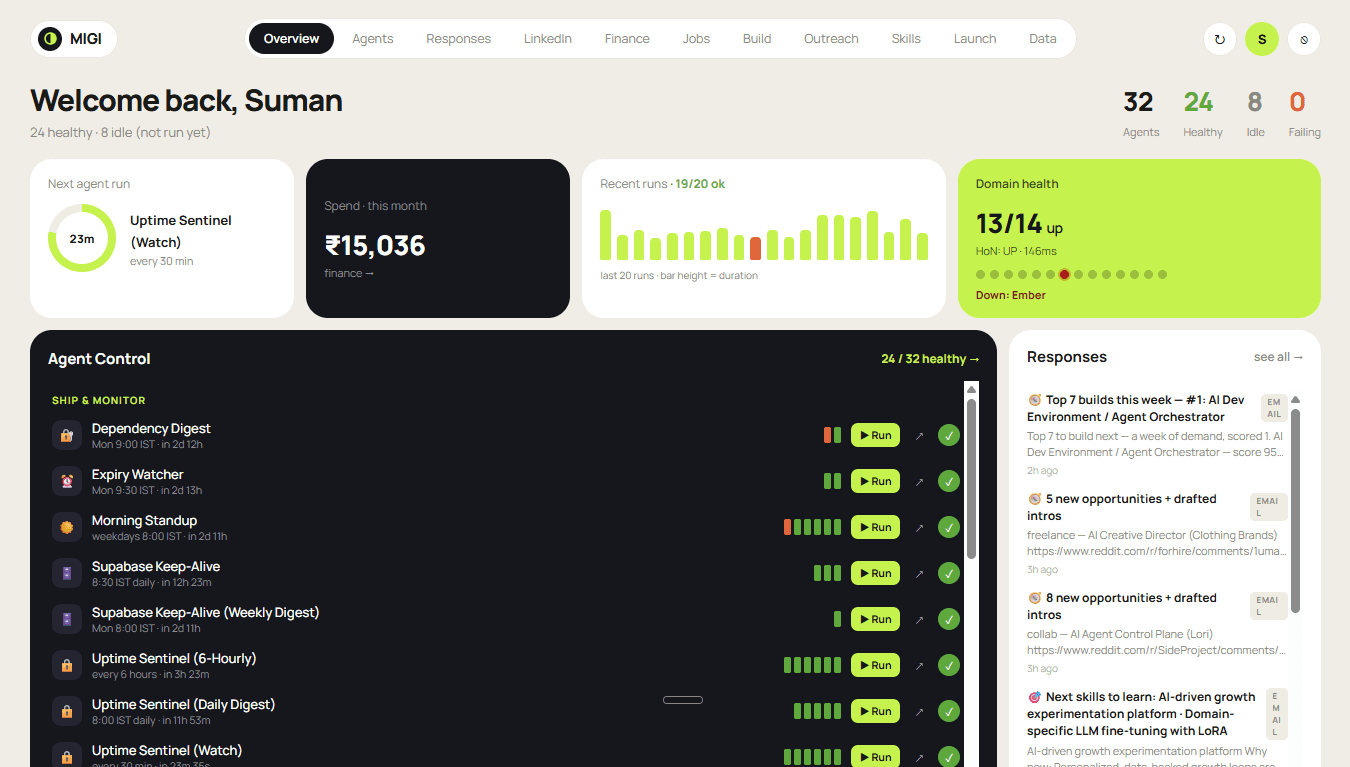
The home summary: fleet health, a live next-run countdown, month-to-date spend, real-time domain health, one-click Run, and the latest responses.
Under the hood
Product-grade, all the way down.
The upgrades that don’t show up in a screenshot but make the whole system feel like a product — from the emails it sends to how it survives a provider outage.
Designed email templates
Every automated email the fleet sends is now a designed template — tiles, sections and brand accents — so reports read like a product, not a log dump.
A robust hashtag engine
Relevant, never-junk hashtags across all posting — real, clickable tags instead of keyword soup.
LLM resilience
Calls auto-retry transient provider outages and fall back to a second AI provider if one is down — so a spike doesn't kill a run.
Secure & mobile
Operating a system means being able to secure it.
The console grew up on access, too. Sessions now persist on a 7-day rolling window instead of dropping me every few hours, a Devices page shows every place I’m logged in and lets me remotely log out any one — or everywhere — in a tap, and the whole panel is fully responsive, so I can run the fleet from my pocket.
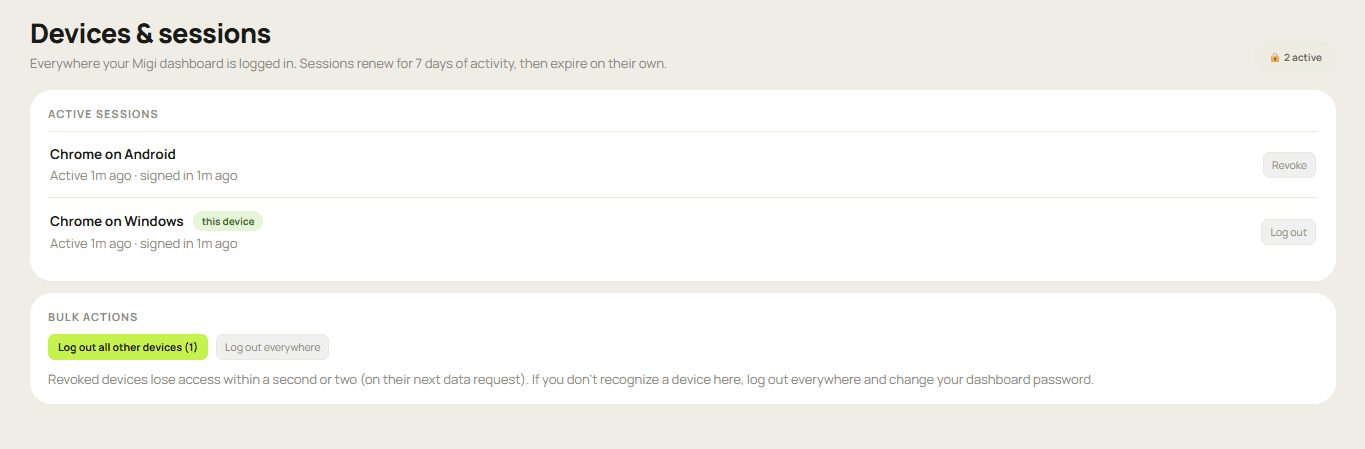
The Devices & sessions page — every logged-in device, with one-tap revoke, log-out-others, or log-out-everywhere.
Persistent, revocable sessions
A 7-day rolling window that renews as I use it — no more random logouts, and still killable on demand.
Remote device logout
See every device the dashboard is logged in on, and revoke any one, all others, or everywhere in a tap.
Mobile-first control panel
A compact menu and cards that reflow for a phone — the whole fleet, run from my pocket.
I had it independently security-audited. Twice.
Migi runs my private life — my journal, my finances, my content, my job hunt — so I treated it like any real product that holds sensitive data. This wasn’t a feature cycle; it was a security-maturity cycle: two independent AI-driven audits of the whole system, reconciled into one plan and fixed in phases, then hardened end to end against the specific ways AI systems get attacked. Handling private data responsibly is part of the build, not an afterthought — and this is proactive hardening, never a response to a breach.
Independently audited, hardened in phases
Because Migi runs my private life, I treated it like production software: I put the whole system — the fleet and the dashboard — through two independent AI-driven security audits, reconciled the findings into one prioritized plan, and fixed them high-to-low, each phase verified before the next, ending in a clean build and a live deploy.
Fail-closed authentication
The password + authenticator-app 2FA now fails closed: if any security setting is ever missing or misconfigured, it denies access instead of silently opening. Every view of private or financial data re-verifies my session on the server, and repeated failed logins lock out and ping me instantly.
Private data, sealed at every layer
Database access is locked so nothing is readable without the server's own key, my single most sensitive stored credential is encrypted at rest, and secrets live only in the platform vault — never in the code, the browser, or the logs.
Hardened against AI-specific attacks
The agents treat any web page or feed they read as untrusted data, never as instructions — so a malicious page can't hijack them. The AI tool layer got allowlists and a read-only mode, with guards against server-side request forgery and injection in the automation pipeline.
The web fundamentals, done right
Clickjacking protection, cross-site-request-forgery checks and strict browser security headers across the dashboard, plus brute-force lockouts with instant alerts — belt and suspenders on top of the AI-specific work.
Built solo — the AI-native way.
From architecture to 46 agents to a multi-agent system, a knowledge brain and a secure dashboard: designed and shipped by one person orchestrating an AI coding agent, end to end, on entirely free infrastructure.
Built with Claude Code
From architecture to 46 agents to a secure dashboard — designed and shipped by orchestrating an AI coding agent, solo.
On free infrastructure
GitHub Actions, free LLM tiers, Supabase and Vercel free plans. The whole fleet runs 24/7 at zero running cost.
Humans in the loop
Drafts and queues, never auto-send to the outside world. LinkedIn is draft-only; nothing leaves without approval.
One repo, many agents
A single public monorepo with a shared lib/ foundation — one place to add an agent, one brain they all share.
the AI-age operating model
Don’t just use AI.
Design, build and operate it.
Migi is the proof: a fleet that does my work, a team of agents I hand goals to, and a second brain I can talk to — routed to the right AI per job, independently security-audited, and shipped solo with Claude Code. Leverage without headcount, built like a product.
Migi · a three-pillar operator OS: fleet + multi-agent system + knowledge brain · built with Claude Code by Suman Debnath